
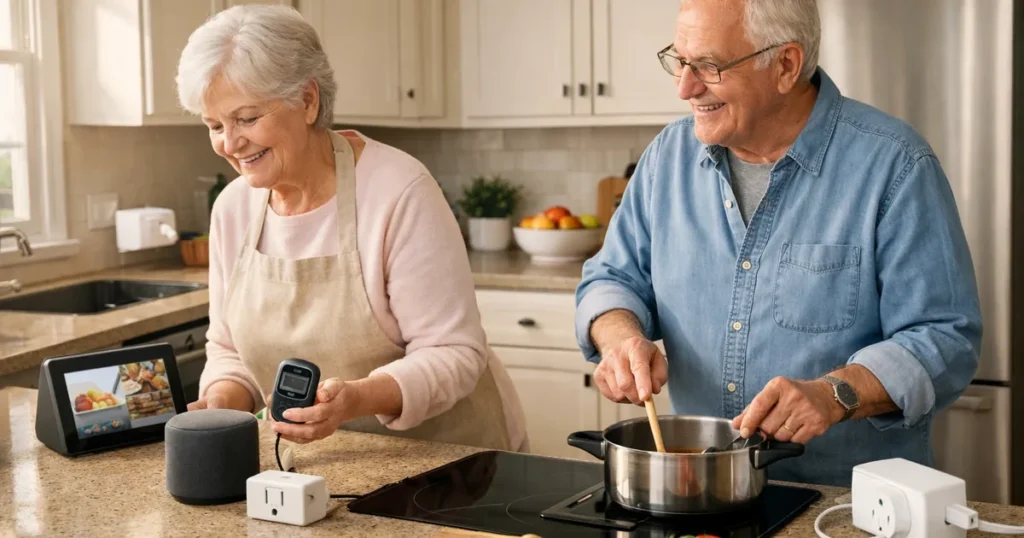
Learning how seniors can use amazon alexa in the kitchen starts with small, useful jobs rather than a complicated smart-home makeover. A spoken timer can be easier than watching a tiny microwave display while stirring a pot. Voice reminders may help keep a familiar routine on track, and a screen can place a recipe or video at a comfortable viewing height. These tools can support independence without requiring someone to hold a phone with floury hands or search for reading glasses.
The best setup depends on the person and the kitchen. Someone with limited grip strength may appreciate a voice command, while someone with hearing or vision changes may prefer a display with large visual timers. Caregivers should also consider counter space, cord placement, noise, privacy settings, and whether the person can comfortably repeat a command if Alexa misunderstands it. Smart plugs need particular care: they are not suitable for every appliance or every cooking task. Start with one routine, practice it together, and keep ordinary safety habits in place.
Quick Picks
Best Overall: Amazon Echo Show 11 with Alexa
The Amazon Echo Show 11 with Alexa combines a large Full-HD display with voice control, recipe viewing, videos, timers, and reminders. It suits a kitchen where seeing information clearly matters as much as hearing it.
Best Budget: Amazon Echo Dot with Alexa
The Amazon Echo Dot with Alexa focuses on the core hands-free jobs: spoken timers, reminders, and compatible smart-home commands. Its compact speaker format is a straightforward starting point for a simpler kitchen routine.
Easiest to Use: Kasa Smart Plug Mini HS103 (2-Pack)
After a caregiver completes safe setup, the Kasa Smart Plug Mini HS103 (2-Pack) offers familiar voice commands plus timers and schedules. It can simplify control of an appropriate plug-in device without adding a hub.
How seniors can use amazon alexa in the comparison table
| Product | Type | Key features | Why it may help | Amazon |
|---|---|---|---|---|
| Amazon Echo Show 11 with Alexa | Alexa smart display | Eleven-inch Full-HD display; Alexa voice control; Spatial audio; Recipe and video viewing | The large screen can show recipes and cooking videos while voice control handles timers and reminders hands-free. | |
| Amazon Echo Dot with Alexa | Alexa smart speaker | Alexa voice control; Timers and reminders; Compact speaker; Smart-home device control | Voice timers, reminders, and connected-device commands can support hands-free kitchen routines. | |
| Kasa Smart Plug Mini HS103 (2-Pack) | Alexa-compatible smart plug | Works with Alexa and Google Assistant; Remote app control; Timers and schedules; No hub required | Voice control and schedules can reduce reaching behind appliances, provided a caregiver completes setup safely. | |
| Govee Smart Plug with Energy Monitoring (4-Pack) | Energy-monitoring smart plug | Alexa and Google Assistant support; Timer and group control; Energy monitoring; Wi-Fi and Bluetooth | Voice control and visible energy data can help a caregiver check selected plug-in devices remotely. | |
| MEATER Plus Smart Wireless Meat Thermometer | App-connected wireless thermometer | Wireless probe; Guided cooking app; Bluetooth connectivity; Temperature alerts | Remote alerts reduce repeated oven opening, though the phone app is best for seniors comfortable with setup. | |
| Amazon Smart Plug | Alexa-compatible smart plug | Works with Alexa; Voice control; App control; Schedules and routines; No smart-home hub required | Voice control and schedules can reduce reaching for a difficult outlet after safe caregiver setup. | |
| Kasa Matter Smart Plug KP125M | Matter-compatible smart plug | Matter compatibility; App and voice control; Energy monitoring; Schedules and timers; Compact outlet design | Remote control, energy monitoring, and schedules help a caregiver supervise suitable low-risk appliances. | |
| Amazon Echo Show 8 (Newest Model) | Alexa smart display | Eight-inch touchscreen; Alexa voice control; Visual timers and reminders; Video calling; Smart-home controls | Large visual timers, voice prompts, and caregiver calls can support kitchen routines after privacy-conscious setup. |
Detailed Reviews
Amazon Echo Show 11 with Alexa
The Amazon Echo Show 11 with Alexa is an Alexa smart display built around an eleven-inch Full-HD screen, Alexa voice control, spatial audio, and recipe and video viewing. For an older adult who finds a speaker-only device too invisible, the larger visual reference can make a timer, cooking step, or reminder feel easier to follow from across part of the counter.
Its main kitchen advantage is the combination of hands-free requests and a display that can stay in view while food is being prepared. It is worth choosing a stable, dry location away from splashes and heat, then practicing a few consistent phrases. The screen adds useful visual context, but it also means there is more to learn than with a basic voice speaker.
Pros
- Eleven-inch Full-HD display
- Hands-free Alexa voice control
- Recipes and videos can be viewed
- Timers and reminders support routines
Cons
- Requires a clear counter location
- Screen-based features may take practice
Best for…
- Cooks who prefer a large display
- Following recipes step by step
- Visual timer and reminder users
Amazon Echo Dot with Alexa
The Amazon Echo Dot with Alexa is a compact smart speaker that handles Alexa voice control, timers, reminders, and compatible smart-home device control. It does not provide a recipe screen, but that simplicity can be helpful for a person who mainly wants to ask for a timer, hear a reminder, or control an already configured device without touching an outlet or phone.
A speaker is often a sensible first step because it can establish whether voice commands fit the person’s habits. Put it where it can be heard over normal kitchen activity but where its cord will not create clutter. Since there is no visual display for a recipe, caregivers may want to keep spoken requests short and use it for a small number of repeatable tasks.
Pros
- Compact speaker format
- Voice timers and reminders
- Compatible smart-home control
- No touchscreen to manage
Cons
- No visual recipe display
- Commands may be harder to hear in a noisy kitchen
Best for…
- Simple spoken kitchen routines
- First-time Alexa users
- Small counter spaces
Kasa Smart Plug Mini HS103 (2-Pack)
The Kasa Smart Plug Mini HS103 (2-Pack) is an Alexa-compatible smart plug that also works with Google Assistant. Its verified features include remote app control, timers, schedules, and no hub requirement. Paired with an established voice assistant, it can make an appropriate plug-in device easier to control without reaching behind a cabinet or bending toward a hard-to-access wall outlet.
Setup should be handled carefully before an older adult relies on it. A caregiver can decide whether the intended appliance is appropriate for this kind of control, confirm that cords remain secure, and demonstrate the exact voice command. Schedules are helpful when they match an existing routine, but they should not replace attention to food, heat, or appliance instructions.
Pros
- Works with Alexa and Google Assistant
- Timers and schedules are available
- Remote app control
- No hub required
Cons
- Needs safe initial setup
- Not appropriate for every kitchen appliance
Best for…
- Accessible control of suitable devices
- Caregiver-configured routines
- Homes without a smart-home hub
Govee Smart Plug with Energy Monitoring (4-Pack)
The Govee Smart Plug with Energy Monitoring (4-Pack) supports Alexa and Google Assistant and includes timer and group control, energy monitoring, Wi-Fi, and Bluetooth. The group-control feature may be useful for organizing selected compatible devices under clear names. Its energy information gives a caregiver another visible detail to review when checking the setup of a selected plug-in device.
This is a more involved choice than a basic voice speaker, so clear labels and a simple household plan matter. Use plain device names that are easy to remember, and avoid creating a long list of commands. Energy monitoring can inform oversight, but it does not make an appliance automatically safe to leave unattended. Consider it for carefully chosen devices after safe setup and a walk-through.
Pros
- Alexa and Google Assistant support
- Timer and group control
- Energy monitoring included
- Wi-Fi and Bluetooth
Cons
- Requires thoughtful setup
- Monitoring does not replace supervision
Best for…
- Caregivers managing selected plugs
- Organized device groups
- Households wanting energy data
MEATER Plus Smart Wireless Meat Thermometer
The MEATER Plus Smart Wireless Meat Thermometer uses a wireless probe, Bluetooth connectivity, a guided cooking app, and temperature alerts. Its central benefit is reducing the need to repeatedly open the oven or grill simply to check progress. For someone comfortable using a phone or tablet, alerts can provide a prompt to return to the kitchen instead of relying on memory alone.
This thermometer is app-connected rather than an Alexa display or speaker, so it works best when the user is comfortable with the initial setup and reading app information. The wireless probe and guided app may make a cooking task feel more organized, but the cook still needs to follow food-safety guidance and use normal care around hot cookware. A family member can help establish the app before regular use.
Pros
- Wireless probe
- Guided cooking app
- Bluetooth connectivity
- Temperature alerts
Cons
- Uses a phone app
- Initial setup may be less simple for some users
Best for…
- Cooks comfortable with apps
- Reducing repeated oven checks
- Alert-based meal preparation
Amazon Smart Plug
The Amazon Smart Plug works with Alexa and offers voice control, app control, schedules, routines, and no smart-home hub requirement. It is a direct option for an Alexa-centered household that wants a compatible plug to fit into simple spoken routines. A command can be easier than reaching for a difficult outlet, especially when a device has already been named clearly during setup.
Keep the routine narrow and understandable. A caregiver should choose a suitable plug-in device, check the location and cords, and explain which commands are available. Schedules and routines can be convenient for predictable tasks, yet they should be used with attention to the appliance’s own instructions and never as a substitute for monitoring active cooking or heat-producing equipment.
Pros
- Works with Alexa
- Voice and app control
- Schedules and routines
- No hub required
Cons
- Safe setup is essential
- Not a replacement for active kitchen supervision
Best for…
- Alexa-centered homes
- Simple voice-controlled routines
- Hard-to-reach suitable outlets
Kasa Matter Smart Plug KP125M
The Kasa Matter Smart Plug KP125M is a Matter-compatible smart plug with app and voice control, energy monitoring, schedules, timers, and a compact outlet design. Matter compatibility may appeal to households that are building a broader connected-home setup. In a kitchen, its practical value is organized control of a carefully selected low-risk plug-in device and a way to set simple scheduled actions.
The compact design can be useful where outlet space is limited, but the outlet should remain accessible and cords should not be pinched or stretched. Energy monitoring and remote control may help a caregiver supervise the setup, yet neither feature removes the need to choose appropriate appliances. Keep commands memorable, test them together, and make sure the older adult knows the ordinary manual controls too.
Pros
- Matter compatibility
- App and voice control
- Energy monitoring
- Schedules and timers
- Compact outlet design
Cons
- Requires compatible setup choices
- Only suitable for selected low-risk appliances
Best for…
- Matter-compatible households
- Caregiver oversight of selected devices
- Limited outlet space
Amazon Echo Show 8 (Newest Model)
The Amazon Echo Show 8 (Newest Model) is an Alexa smart display with an eight-inch touchscreen, voice control, visual timers and reminders, video calling, and smart-home controls. It provides a middle ground for someone who wants to see timer information and interact by voice without placing a larger display on the counter. Video calling can also help families stay connected around meal routines.
A privacy-conscious setup is important before using camera or calling features. Review the device settings together, decide which calling functions are wanted, and place the display so that it is useful without pointing toward areas the household prefers to keep private. The touchscreen is available, but voice prompts may be the more comfortable option when hands are wet, sore, or busy.
Pros
- Eight-inch touchscreen
- Alexa voice control
- Visual timers and reminders
- Video calling
- Smart-home controls
Cons
- Privacy settings need review
- Smaller screen than the Echo Show 11
Best for…
- Visual timers in a moderate footprint
- Families using video calls
- Voice-first kitchen reminders
Buying Guide
Begin with one helpful kitchen habit
The most successful Alexa setup is usually modest. Choose one task that already happens often: setting a tea timer, announcing a medication-independent meal reminder, or asking for a conversion while cooking. Practice the same wording several times. A short command is easier to remember, and it gives a caregiver a clear way to tell whether the tool is actually helping.
Avoid adding multiple routines on the first day. Too many device names, apps, and commands can turn a convenience into a frustration. If voice control is not understood reliably, use the manual controls that are already familiar and reconsider whether a smart device is the right fit.
- Start with a timer or reminder
- Use plain, distinct device names
- Write down key commands if helpful
- Keep manual controls available
For another senior-friendly comparison, see our guide to pros and cons of digital displays in senior kitchens before narrowing down your options.
Match the device to vision, hearing, and mobility needs
A screen can be valuable when visual timers, recipe steps, or video content are easier to follow than speech alone. An Echo speaker may be better when counter space is limited and the goal is simply hearing an alert. Think about usual kitchen noise as well: a running faucet, vent fan, or dishwasher can make spoken responses harder to catch.
Place any device on a stable, dry surface with a clear path to its power cord. The screen or speaker should be close enough for normal use without requiring a person to lean across a hot cooktop. For more ideas about readable interfaces, see Pros and Cons of Digital Displays in Senior Kitchens.
- Choose large visual information when needed
- Check alert volume during normal activity
- Avoid heat and splash zones
- Keep cords out of walking paths
You may also find our practical advice about senior kitchen safety checklist (printable – ) helpful while planning an easier-to-use kitchen.
Use smart plugs with practical safety limits
Smart plugs can reduce awkward reaching, but they are not general-purpose kitchen safety tools. Before connecting one, a caregiver should review the appliance instructions, inspect the outlet and cord, and decide whether remote or scheduled control is appropriate. Do not assume a voice command makes an appliance safe to operate without attention.
Use schedules only for tasks that remain appropriate under the appliance’s instructions. Smart control cannot watch food, clear a counter, or respond to smoke, spills, or a forgotten utensil. A broader review of trip hazards, outlets, and daily habits can be supported by the Senior Kitchen Safety Checklist (Printable – 2026).
- Have a caregiver complete setup
- Keep appliance cords visible and secure
- Do not rely on automation for active cooking
- Review routines after any kitchen change
Set up support, privacy, and a backup plan
Family support is most useful before a problem occurs. Make sure a trusted person knows the device names, the basic app location if one is used, and how to turn a routine off. For a smart display with video calling, review privacy choices together and only enable functions the household understands and wants.
Finally, decide what happens when Wi-Fi is unavailable or a command is missed. A simple paper timer, ordinary appliance controls, and written cooking steps remain worthwhile backups. Technology should reduce friction, not make a person feel dependent on a connection or embarrassed to ask for help.
- Review privacy choices together
- Limit access to trusted helpers
- Keep a non-smart backup timer
- Revisit the setup periodically
Frequently Asked Questions
What is the simplest way for an older adult to start using Alexa in the kitchen?
Begin with one spoken timer. Practice a clear phrase for setting it and another for checking how much time remains. Once that feels comfortable, add one reminder or one carefully chosen compatible device. Starting small makes it easier to tell which features are genuinely useful.
Is an Alexa screen better than an Alexa speaker for seniors?
It depends on how the person prefers to receive information. A smart display can show visual timers, recipes, and reminders, which may help with vision or memory support. A speaker can be less cluttered and simpler for spoken timers. Consider counter space, hearing, and comfort with touchscreens.
Can Alexa replace a kitchen timer or regular safety habits?
No. Alexa can provide a useful reminder, but it cannot watch food, notice a spill, or make an unattended cooking task safe. Continue using appliance instructions, staying nearby when needed, and following normal kitchen safety practices. Keep a basic timer available as a backup.
Are smart plugs safe for kitchen appliances?
Suitability depends on the specific appliance, its instructions, the outlet, and the intended use. A caregiver should complete setup and decide whether voice or scheduled control is appropriate. Smart plugs should not be treated as permission to leave active cooking or heat-producing appliances unattended.
How can a caregiver make Alexa commands easier to remember?
Use short, natural names such as “kitchen lamp” rather than names that sound alike. Limit the setup to a few routine commands, demonstrate them in the actual kitchen, and write down the most useful phrases. Check in later to remove routines that are confusing or rarely used.
What should families consider about privacy with an Alexa smart display?
Review the available privacy and calling settings before the display becomes part of daily life. Discuss where it will sit, who may call, and which features are wanted. Choose settings the household understands, and revisit them if living arrangements or support needs change.
Conclusion
Knowing how seniors can use amazon alexa in the kitchen is less about buying the most connected device and more about making one daily task easier. A speaker can cover simple timers and reminders, while a display adds visual guidance for recipes and alerts. Smart plugs and connected thermometers can be useful in carefully selected routines, especially with thoughtful caregiver setup.
Choose the option that matches the person’s comfort with voice commands, screens, and apps. Keep cords and counters clear, preserve familiar manual methods, and treat every smart feature as an aid to—not a replacement for—safe cooking attention.