
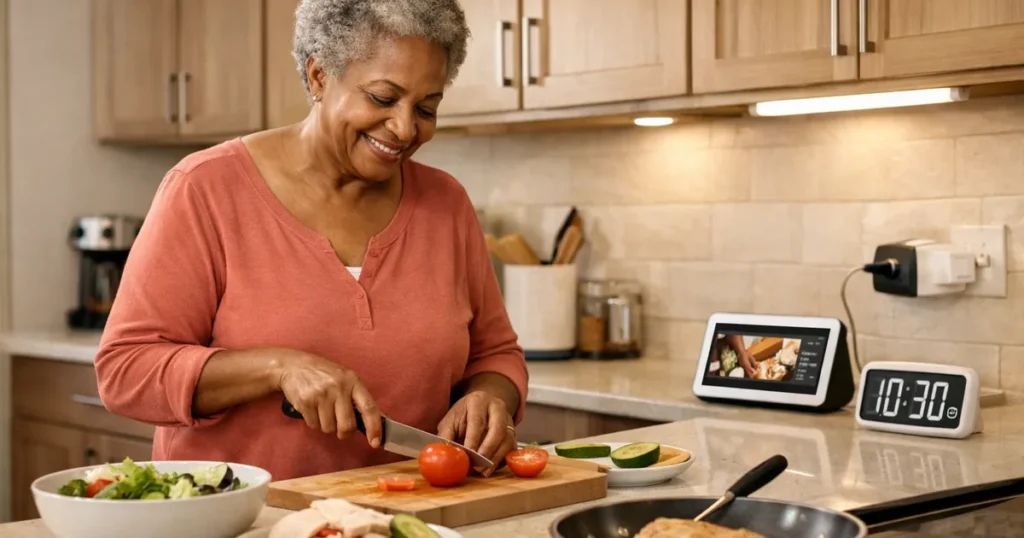
Learning how to set up a smart kitchen for aging in place starts with making familiar tasks easier, not filling the counter with complicated gadgets. For an adult child helping a parent, begin with one daily frustration: reaching for a light switch, hearing a timer, checking food, or remembering whether a compatible non-heating appliance was switched off. The most useful setup supports independence while leaving established cooking habits intact.
Start with visibility, clear controls, and an uncluttered work area. Voice controls may help when reading a screen or handling a device is inconvenient, while a large timer and task lighting can improve awareness without changing how someone cooks. Add only devices the older adult is willing and able to use, then arrange a calm setup session with a few repeatable routines.
Quick Picks
Best Overall: Amazon Echo Show 11 (newest model), Vibrant Full-HD 11" display with more viewing area and spatial audio
A smart display can provide a central screen-and-voice location for a small, organized kitchen setup when a family member can help with initial setup and practice.
Best Budget: Kasa Smart Plug HS103P2, Wi-Fi Outlet Works with Alexa
This listed two-pack smart-plug option suits a limited setup focused on compatible, appropriate non-heating appliances rather than changing every outlet at once.
Easiest to Use: Govee Smart Plug with Energy Monitoring, WiFi Bluetooth Outlet
The listed four-pack can simplify a coordinated outlet plan after the household has identified each compatible appliance, outlet location, and load limit.
How to set up a smart kitchen for comparison table
| Product | Type | Key features | Why it may help | Amazon |
|---|---|---|---|---|
| Amazon Echo Show 11 (newest model), Vibrant Full-HD 11" display with more viewing area and spatial audio | Smart display | Smart display design; Exact model/variant identified by ASIN B0DC91H3JK | Consider screen readability and voice controls. Setup assistance may be needed. | |
| Kasa Smart Plug HS103P2, Wi-Fi Outlet Works with Alexa | Smart plug | Smart plug design; Listed 2-Pack | Check appliance compatibility and load limits. Do not recommend unattended heating or bypassing appliance controls. | |
| Govee Smart Plug with Energy Monitoring, WiFi Bluetooth Outlet | Smart plug | Smart plug design; Listed 4 Pack | Check appliance compatibility and load limits. Do not recommend unattended heating or bypassing appliance controls. | |
| MEATER Plus Smart Meat Thermometer, Honey | Food thermometer | Food thermometer design; Exact model/variant identified by ASIN B07H8WTFHW | Compare display readability and probe handling before choosing for an older cook. | |
| EZVALO 134 LED Under Cabinet Lights, 4000mAh Rechargeable Motion Sensor Light Indoor | Under-cabinet lighting | Under-cabinet lighting design; Listed 2 Pack | Consider task-light placement, charging access and installation support. | |
| JOYHILL Digital Kitchen Timer with Large LED Display | Large-display kitchen timer | Large LED digits; Magnetic back; Three volume levels; Countdown and count-up modes | Large digits and adjustable sound make cooking time easier to see and hear across the kitchen. | |
| Kasa Matter Smart Plug with Energy Monitoring, KP125MP2 | Smart plug | Smart plug design; Listed 1800W | Check appliance compatibility and load limits. Do not recommend unattended heating or bypassing appliance controls. |
Specifications and cleaning comparison
Specifications are cited only where exact-model evidence was recorded. Unverified details remain unconfirmed, and these notes do not represent hands-on product testing.
| Product | Weight | Dimensions | Controls | Cleaning and handling limitations |
|---|---|---|---|---|
| Amazon Echo Show 11 (newest model), Vibrant Full-HD 11" display with more viewing area and spatial audio | Not verified for this exact model. | Not verified for this exact model. | Not verified for this exact model. | Not verified for this exact model. |
| Kasa Smart Plug HS103P2, Wi-Fi Outlet Works with Alexa | Not verified for this exact model. | Not verified for this exact model. | Not verified for this exact model. | Not verified for this exact model. |
| Govee Smart Plug with Energy Monitoring, WiFi Bluetooth Outlet | Not verified for this exact model. | Not verified for this exact model. | Not verified for this exact model. | Not verified for this exact model. |
| MEATER Plus Smart Meat Thermometer, Honey | Not verified for this exact model. | Not verified for this exact model. | Not verified for this exact model. | Not verified for this exact model. |
| EZVALO 134 LED Under Cabinet Lights, 4000mAh Rechargeable Motion Sensor Light Indoor | Not verified for this exact model. | Not verified for this exact model. | Not verified for this exact model. | Not verified for this exact model. |
| JOYHILL Digital Kitchen Timer with Large LED Display | Not verified for this exact model. | Not verified for this exact model. | Not verified for this exact model. | Not verified for this exact model. |
| Kasa Matter Smart Plug with Energy Monitoring, KP125MP2 | Not verified for this exact model. | Not verified for this exact model. | Not verified for this exact model. | Not verified for this exact model. |
Detailed Reviews
Amazon Echo Show 11 (newest model), Vibrant Full-HD 11" display with more viewing area and spatial audio
The Amazon Echo Show 11 is a smart display that can act as one central point for a connected kitchen. Its screen-and-voice design may suit a person who prefers spoken requests but also benefits from viewing information on a larger display area. It is most sensible when the household has a few clear tasks in mind rather than an expectation that every kitchen activity must become connected.
Plan for initial setup assistance before making it the hub of a routine. Place the display where it can be seen and heard without crowding the food-prep zone or obstructing a counter. Practice only a few useful commands at first, and keep ordinary kitchen controls available. A short routine that the older adult remembers is more helpful than a long feature list.
Pros
- Smart display design
- Voice-control consideration
- Screen readability can be assessed
- Central kitchen location
Cons
- Initial setup assistance may be needed
- Placement needs counter-space planning
Best for…
- Voice-oriented kitchen routines
- Families creating one central location
- Users comfortable learning repeatable commands
Kasa Smart Plug HS103P2, Wi-Fi Outlet Works with Alexa
The Kasa Smart Plug HS103P2 is a listed two-pack smart-plug option for adding outlet control to compatible appliances. It can be a measured way to begin a smart-kitchen plan because the household can concentrate on one or two selected outlets instead of changing the entire kitchen at once. Keep the choice tied to a specific routine that the older adult understands.
Compatibility is the essential safety check. Confirm appliance instructions, plug arrangement, and applicable load limits before use, and leave access to the physical plug. A smart plug is not a reason to operate heating appliances without supervision, defeat built-in controls, or crowd an outlet area. Label the appliance connected to each plug so another family member can understand the setup.
Pros
- Smart plug design
- Listed two-pack
- Supports a focused setup
- Does not alter the appliance
Cons
- Appliance compatibility must be checked
- Load limits must be checked
- Not for unattended heating
Best for…
- Gradual smart-kitchen plans
- Compatible non-heating appliance routines
- Two outlet-control locations
Govee Smart Plug with Energy Monitoring, WiFi Bluetooth Outlet
The Govee Smart Plug with Energy Monitoring is a WiFi and Bluetooth smart-plug option listed as a four-pack. A multi-pack may be practical when several approved outlets are part of one organized plan. It is not automatically the simpler choice for every kitchen: more connected outlets also mean more appliance labels, compatibility checks, and instructions for the household to maintain.
Keep outlet control understandable. Identify the appliance attached to each plug, retain access to the wall outlet, and explain the intended routine to the older adult. Check compatibility and load limits for every appliance separately. Do not use a smart plug to leave heating equipment operating without supervision or to bypass normal appliance controls, even if remote control appears convenient.
Pros
- Smart plug design
- WiFi and Bluetooth listing
- Listed four-pack
- Energy-monitoring feature is listed
Cons
- Every appliance needs a compatibility check
- Load limits need review
- Not for unattended heating appliances
Best for…
- Several compatible outlet locations
- Organized multi-device setups
- Caregivers assisting with configuration
MEATER Plus Smart Meat Thermometer, Honey
The MEATER Plus Smart Meat Thermometer is a food thermometer for cooks considering a connected way to check food temperature. For aging-in-place planning, the practical questions are whether information is easy to read and whether the probe can be handled comfortably and safely. A smart feature has value only when it makes the temperature-checking routine clearer for the person cooking.
Review probe handling before purchase and keep the device accessible during cooking. The older cook should be comfortable using the related display or phone-based information as part of an established food-preparation routine. If handling the probe or following connected information feels burdensome, a more direct thermometer format may be the better fit. Keep food-contact tools clean and stored safely.
Pros
- Food thermometer design
- Smart thermometer format
- Prompts a display-readability check
- Encourages probe-handling planning
Cons
- Probe handling should be assessed
- Display readability should be assessed
- May add a learning step
Best for…
- Cooks comfortable with smart devices
- Households reviewing temperature routines
- Buyers checking probe handling first
EZVALO 134 LED Under Cabinet Lights, 4000mAh Rechargeable Motion Sensor Light Indoor
The EZVALO 134 LED Under Cabinet Lights are rechargeable indoor motion-sensor lights listed as a two-pack. Task lighting can be a meaningful kitchen improvement when counters, appliance controls, or cabinet interiors are difficult to see in ordinary room lighting. This type of change can improve a work area without asking the cook to learn a new appliance routine.
Plan locations before installation. A useful position improves visibility without causing glare, deep shadows, or blocked cabinet access. Confirm the lights can be reached for charging without climbing, overreaching, or moving heavy countertop items. Installation support may be helpful, and the older adult should understand how the motion-sensor behavior fits the kitchen’s usual traffic and work pattern.
Pros
- Under-cabinet lighting design
- Rechargeable design
- Motion-sensor feature is listed
- Listed two-pack
Cons
- Charging access needs planning
- Installation support may be needed
- Placement should avoid glare or shadows
Best for…
- Dim counter work areas
- Cabinet-area task lighting
- Families helping select locations
JOYHILL Digital Kitchen Timer with Large LED Display
The JOYHILL Digital Kitchen Timer has large LED digits, countdown and count-up modes, a magnetic back, and three volume levels. These straightforward features can be useful for someone who mainly needs cooking time to be easier to see and hear. Unlike a broader smart-home device, a timer can be a focused upgrade that preserves a familiar kitchen routine.
Put it where the digits can be read from the usual prep area, then test which alert volume is noticeable without being unpleasant. The magnetic back can help keep it visible instead of lost in a drawer, but placement should not block another control or create clutter. A timer supports time awareness; it does not replace active cooking supervision or ordinary attention to hot food.
Pros
- Large LED digits
- Three volume levels
- Countdown and count-up modes
- Magnetic back
Cons
- Placement depends on kitchen layout
- Sound level should be tested
- Does not replace active supervision
Best for…
- Cooks needing a clearer timer display
- Kitchens where adjustable alerts help
- A simple accessibility upgrade
Kasa Matter Smart Plug with Energy Monitoring, KP125MP2
The Kasa Matter Smart Plug with Energy Monitoring KP125MP2 is a smart-plug option listed at 1800W. It may be considered only after the buyer confirms that the intended appliance, outlet arrangement, and load requirements are appropriate for the exact use. The Matter designation may matter to households planning around that type of setup, but it does not remove the need for a simple, clearly explained routine.
Make the physical arrangement easy to understand. Keep the appliance’s own controls available, avoid outlet overcrowding, and document what is connected. Remote or scheduled outlet control is not permission to leave heating equipment unattended or to bypass appliance instructions. For a parent who does not want to manage another connected device, a timer or task light may be a more appropriate first improvement.
Pros
- Smart plug design
- Energy-monitoring feature is listed
- Listed 1800W
- Matter designation is listed
Cons
- Compatibility requires confirmation
- Load limits require confirmation
- Not for unattended heating or bypassing controls
Best for…
- Compatible appliance outlets
- Matter-oriented household setups
- Buyers documenting connected appliances
Buying Guide
Start With a Single Daily Task
Ask what makes the kitchen harder now. The issue may be poor task lighting, a timer that cannot be heard, uncertainty about a routine, or difficulty reading small controls. Solve that one problem first. A large-display timer and well-placed under-cabinet light can be more useful than several app-connected devices because they address a visible, specific need.
For an adult child, involve the parent in choosing and placing each item. Watch how the person uses the counter, reaches for an outlet, and responds to an alert. A device that seems logical to a helper but feels unfamiliar to the cook may remain unused. The goal is a calmer routine, not a more technical kitchen.
- Choose one task before choosing technology.
- Keep frequently used controls within easy reach.
- Avoid adding devices just because they are connected.
- Make the first change easy to reverse if it does not fit.
For another senior-friendly comparison, see our guide to 10 features to look for in appliances for seniors before narrowing down your options.
Make Controls Clear and Physical Access Easy
Check whether labels, screens, and alerts can be seen and heard from the usual work position. Voice control can reduce some reaching and screen-reading, but it still requires configuration and a reliable routine. Keep manual controls available and show the user what happens if Wi-Fi, a phone, or an app is not in use. This is an important part of how to set up a smart kitchen for a person who values familiar habits.
Counter space matters as much as device features. Leave room for food preparation, keep cords away from sink areas and hot surfaces, and do not block access to a wall outlet or appliance control panel. Choose a display, timer, or light position that can be reached without leaning over a hot cooktop or stretching across a work area.
- Test alert volume in the actual kitchen.
- Use short, memorable voice commands.
- Place chargers where they can be reached safely.
- Keep cords and plugs visible for inspection.
You may also find our practical advice about what every caregiver should know about kitchen tools helpful while planning an easier-to-use kitchen.
Use Smart Plugs Conservatively
A smart plug is appropriate only when the appliance, outlet, and expected electrical load have been confirmed as compatible. Do not use one to bypass appliance instructions or create unattended heating routines. The kitchen remains an active workspace: cooking equipment should be supervised, and ordinary shutdown habits still matter. A plug should simplify a suitable task, not create uncertainty about whether an appliance is on.
Label connected outlets and keep a short written list of which appliance belongs to each one. This helps a caregiver, visitor, or family member use the kitchen normally and identify a plug if it must be disconnected. For broader feature questions, review 10 Features to Look For in Appliances for Seniors and What Every Caregiver Should Know About Kitchen Tools before expanding the system.
- Check appliance instructions and plug requirements.
- Do not overload outlets or power strips.
- Retain normal appliance controls and supervision.
- Review the setup after the first week.
For related buying considerations, explore our guide to warranty & support policies for kitchen devices as part of your comparison.
Plan Setup, Cleaning, and Ongoing Support
A smart kitchen works best when charging, cleaning, and routine adjustments do not become hidden chores. Put rechargeable lights where they can be removed without climbing or overreaching. Keep food-contact tools such as thermometers clean and stored so the probe is not a surprise hazard. A timer, display, and plug should remain visible enough that the user can tell what role each device plays.
Decide who will help with passwords, app settings, or voice routines before purchase. Schedule that help at the beginning instead of assuming the system will be self-explanatory, and write down only the essential steps. Review support options as part of the decision; Best Warranty & Support Policies for Kitchen Devices can help families frame useful questions about setup help and future troubleshooting.
- Confirm who handles setup and troubleshooting.
- Choose visible locations over hard-to-reach placements.
- Keep instructions in an accessible place.
- Revisit the routine when the kitchen layout changes.
Frequently Asked Questions
What is the easiest smart-kitchen upgrade to begin with?
Start with the task that causes the most frequent inconvenience. A large-display timer can support time awareness, while under-cabinet lighting may help when a work surface is dim. Beginning with one uncomplicated change lets the user decide whether more connected features are actually useful, rather than committing to a complicated system.
Are smart plugs safe for kitchen appliances?
Use them only after confirming compatibility, outlet arrangement, and load limits for the exact appliance. Do not use a smart plug to bypass appliance controls or to operate heating equipment without supervision. Keep both the physical plug and the appliance’s normal controls accessible, and label the connected appliance clearly.
Should an older adult use a smart display or a simpler timer?
A smart display may suit someone comfortable with voice commands and initial setup help. A large-display timer may be better when the main need is seeing or hearing cooking time clearly. The best choice is the one the person will use consistently without frustration or extra troubleshooting.
Where should motion-sensor under-cabinet lights go?
Place them where they improve visibility on a common work surface without creating glare, shadows, or blocked cabinet access. Before installation, confirm that the lights can be reached for charging and that the motion-sensor behavior makes sense for the user’s normal movement in the kitchen.
Do connected food thermometers replace ordinary cooking judgment?
No. A connected thermometer can provide another way to check food temperature, but the cook still needs to handle the probe safely, read the information, and follow normal food-preparation practices. Choose this style only if the display and probe routine feel manageable for the person who will use it.
How can families prevent a smart kitchen from becoming confusing?
Limit the system to a few repeatable tasks, label connected outlets, and keep a simple written guide nearby. Practice the routine together after setup. If a device needs frequent troubleshooting, is routinely ignored, or makes the counter feel crowded, simplify the arrangement instead of adding another device.
Conclusion
A useful smart kitchen for aging in place is built around clear, repeatable routines: better light, an easy-to-read timer, and carefully chosen connected controls where they genuinely help. The Echo Show can provide a central voice-and-screen option, while the timer and under-cabinet lights address focused daily needs. Smart plugs call for the most caution because compatibility, electrical limits, and active supervision remain essential.
When deciding how to set up a smart kitchen for a parent, choose the smallest setup that supports confidence and independence, then expand only if it remains easy to use. A thoughtful family conversation before making changes can identify which tasks deserve attention first.