
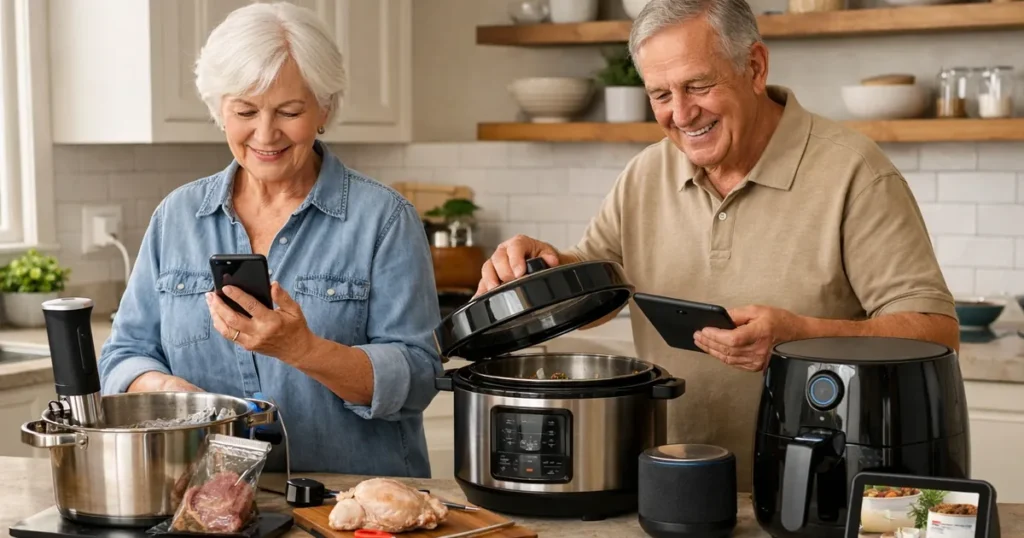
Kitchen technology can be helpful when it reduces unnecessary trips to the oven, makes a timer easier to notice, or lets a family member help with a routine. The best apps for seniors to control kitchen devices should add clarity rather than turn a simple task into a confusing one. A useful setup starts with large, readable phone settings, dependable alerts, and an appliance that still makes sense when the phone is not in hand.
For many older adults, the main concerns are safety, grip strength, vision, noise, and cleaning. Wireless thermometers can reduce repeated checking near a hot oven, while a smart display can put visual timers and voice prompts in one familiar place. Smart plugs require especially careful judgment: they are best reserved for suitable low-risk appliances, not used as a substitute for safe appliance operation.
These apps for seniors to control kitchen devices are not all alike. Some guide a cooking task, some send temperature alerts, and some provide voice or remote controls. Consider who will complete the first setup, whether the user is comfortable with a smartphone, and which kitchen task would genuinely become easier.
Quick Picks
Best Overall: MEATER Plus Smart Wireless Meat Thermometer
The MEATER Plus combines a wireless probe, guided cooking app, Bluetooth connectivity, and temperature alerts. It is a focused choice for someone who wants help monitoring food without repeatedly opening the oven.
Best Budget: Kasa Smart Plug Mini HS103 (2-Pack)
The Kasa Smart Plug Mini HS103 offers app control, timers, schedules, and Alexa or Google Assistant compatibility without requiring a hub. It is positioned for a simple smart-home starting point when setup is handled safely.
Easiest to Use: Instant Pot Pro Plus Wi-Fi Smart 10-in-1 (6 Quart)
The Instant Pot Pro Plus brings ten cooking functions, guided recipes, Wi-Fi app control, and a large digital control panel into one appliance. It can simplify a countertop when a caregiver helps configure the initial programs.
Apps for seniors to control kitchen devices comparison table
| Product | Type | Key features | Why it may help | Amazon |
|---|---|---|---|---|
| MEATER Plus Smart Wireless Meat Thermometer | App-connected wireless thermometer | Wireless probe; Guided cooking app; Bluetooth connectivity; Temperature alerts | Remote alerts reduce repeated oven opening, though the phone app is best for seniors comfortable with setup. | |
| Kasa Smart Plug Mini HS103 (2-Pack) | Alexa-compatible smart plug | Works with Alexa and Google Assistant; Remote app control; Timers and schedules; No hub required | Voice control and schedules can reduce reaching behind appliances, provided a caregiver completes setup safely. | |
| Instant Pot Pro Plus Wi-Fi Smart 10-in-1 (6 Quart) | App-connected multicooker | Wi-Fi app control; Ten cooking functions; Guided recipes; Large digital control panel | A caregiver can help configure guided programs, while one appliance can replace several countertop devices. | |
| Anova Culinary Sous Vide Precision Cooker 3.0 | Wi-Fi sous-vide cooker | Wi-Fi control; 1100-watt heater; Adjustable clamp; App recipes and monitoring | Precise temperature control can reduce overcooking, but safe use requires a suitable pot and confident app setup. | |
| COSORI Pro Gen Smart 5.8-Quart Air Fryer | App- and voice-connected air fryer | App and touch control; Alexa and Google Assistant support; Eleven cooking functions; Dishwasher-safe basket | Remote status and presets can help a caregiver, while the removable basket simplifies cleanup. | |
| Kasa Matter Smart Plug KP125M | Matter-compatible smart plug | Matter compatibility; App and voice control; Energy monitoring; Schedules and timers; Compact outlet design | Remote control, energy monitoring, and schedules help a caregiver supervise suitable low-risk appliances. | |
| Govee Bluetooth Meat Thermometer with Two Probes | App-connected food thermometer | Two temperature probes; Bluetooth app monitoring; Temperature alerts; Backlit display; Magnetic back | Remote alerts reduce repeated checking at a hot oven and make doneness easier to monitor. | |
| Amazon Echo Show 8 (Newest Model) | Alexa smart display | Eight-inch touchscreen; Alexa voice control; Visual timers and reminders; Video calling; Smart-home controls | Large visual timers, voice prompts, and caregiver calls can support kitchen routines after privacy-conscious setup. |
Detailed Reviews
MEATER Plus Smart Wireless Meat Thermometer
The MEATER Plus Smart Wireless Meat Thermometer is an app-connected wireless thermometer built around a wireless probe and Bluetooth connectivity. Its guided cooking app and temperature alerts focus on one useful task: following food temperature without standing at the oven or grill for repeated checks.
For an older cook who is already comfortable opening an app, alerts may make a cooking session feel less watchful and more manageable. The tradeoff is that the phone-based experience is central to how the product works. A family member can help with the initial connection and explain which alerts matter before using it for a meal.
Pros
- Wireless probe keeps monitoring separate from the oven door
- Guided cooking app provides step-by-step support
- Bluetooth connectivity enables app monitoring
- Temperature alerts can reduce repeated checking
Cons
- Best suited to users comfortable with phone setup
- Bluetooth connection is part of normal use
Best for…
- Cooks monitoring roasts or other temperature-sensitive foods
- Older adults comfortable using a guided app
- Families helping with initial device setup
Kasa Smart Plug Mini HS103 (2-Pack)
The Kasa Smart Plug Mini HS103 is an Alexa-compatible smart plug sold as a 2-pack. It provides remote app control, timers, and schedules, works with Alexa and Google Assistant, and does not require a hub. Those features can make selected kitchen routines easier to manage without reaching behind an appliance.
Voice control may be particularly useful where bending or reaching is uncomfortable. Still, a smart plug needs thoughtful placement and safe setup by a caregiver or another confident adult. Use it only with suitable low-risk appliances, and make sure everyone in the household understands what is connected and how the schedule works.
Pros
- Works with Alexa and Google Assistant
- Remote app control supports selected routines
- Timers and schedules can add structure
- No hub required
- Two plugs allow two suitable devices to be set up
Cons
- Safe setup should be completed before regular use
- Appropriate only for suitable low-risk appliances
Best for…
- Voice-control households
- Caregivers setting recurring schedules
- Reducing reaches behind suitable appliances
Instant Pot Pro Plus Wi-Fi Smart 10-in-1 (6 Quart)
The Instant Pot Pro Plus Wi-Fi Smart 10-in-1 is a 6-quart app-connected multicooker with ten cooking functions, guided recipes, Wi-Fi app control, and a large digital control panel. It places several cooking approaches in one countertop appliance, which may appeal to households trying to avoid a collection of separate devices.
The large digital panel offers a direct way to interact with the appliance, while the app adds guided programs and remote connection. Because there are multiple functions and an app component, it is a better fit when a caregiver can help set up preferred programs. Keep the routine simple by choosing a few familiar functions rather than trying every option at once.
Pros
- Ten cooking functions in one appliance
- Wi-Fi app control adds connected guidance
- Guided recipes support program selection
- Large digital control panel is easy to locate
- Six-quart format supports regular meal preparation
Cons
- Initial configuration may need caregiver help
- Multiple functions can require a learning period
Best for…
- Households replacing several countertop devices
- Cooks who value guided recipes
- Families able to simplify the initial setup
Anova Culinary Sous Vide Precision Cooker 3.0
The Anova Culinary Sous Vide Precision Cooker 3.0 is a Wi-Fi sous-vide cooker with an adjustable clamp, app recipes and monitoring, and an 1100-watt heater. Its app-based controls are designed around precise temperature management, which can help a cook follow a controlled cooking process rather than relying solely on frequent visual checks.
This is a more specialized choice than a basic timer or thermometer. It requires a suitable pot, correct clamping, and confidence with app setup before cooking begins. For an older adult who enjoys learning a dedicated method, monitoring through the app can be appealing; for someone seeking the fewest steps, a simpler connected tool may be more comfortable.
Pros
- Wi-Fi control supports app-based monitoring
- Adjustable clamp attaches to a suitable pot
- App recipes provide cooking guidance
- Precise temperature control can help reduce overcooking
Cons
- Requires a suitable pot
- Needs confident app setup
- Designed for a specialized cooking method
Best for…
- Cooks interested in sous-vide preparation
- Users who want precise temperature management
- Families available to help with setup
COSORI Pro Gen Smart 5.8-Quart Air Fryer
The COSORI Pro Gen Smart 5.8-Quart Air Fryer is an app- and voice-connected air fryer with app and touch control, Alexa and Google Assistant support, and eleven cooking functions. Its removable basket is dishwasher-safe, a practical feature for anyone who wants a more straightforward cleanup step after cooking.
Remote status and presets can help a caregiver stay organized around familiar meals, while touch controls provide an on-appliance option. The eleven functions offer flexibility, but it is wise to begin with a small number of understood settings. As with any hot cooking appliance, the app should support attentive use rather than replace ordinary kitchen safety habits.
Pros
- App and touch control provide two control methods
- Alexa and Google Assistant support voice routines
- Eleven cooking functions offer cooking flexibility
- Dishwasher-safe basket simplifies cleanup
- Remote status can support caregiver oversight
Cons
- Several functions may take time to learn
- Hot-appliance safety remains important during use
Best for…
- Cooks who prefer an air fryer format
- Households using Alexa or Google Assistant
- Caregivers helping with presets and status checks
Kasa Matter Smart Plug KP125M
The Kasa Matter Smart Plug KP125M is a Matter-compatible smart plug with app and voice control, energy monitoring, schedules, timers, and a compact outlet design. It is intended to add connected control to suitable devices while keeping the plug itself relatively compact at the outlet.
For a caregiver, schedules and energy monitoring can make it easier to supervise selected low-risk appliance routines. Matter compatibility may also be useful in a home with a compatible smart-home setup. The most important decision is not the app: it is choosing an appropriate appliance and making sure the household understands the control plan before relying on it.
Pros
- Matter compatibility supports compatible smart-home setups
- App and voice control offer flexible operation
- Energy monitoring adds household awareness
- Schedules and timers support routines
- Compact outlet design helps conserve outlet space
Cons
- Requires careful choice of connected appliance
- A compatible smart-home approach may be needed for Matter use
Best for…
- Caregivers supervising suitable low-risk appliances
- Homes using compatible smart-home systems
- Creating predictable timer-based routines
Govee Bluetooth Meat Thermometer with Two Probes
The Govee Bluetooth Meat Thermometer with Two Probes is an app-connected food thermometer with Bluetooth app monitoring, temperature alerts, a backlit display, and a magnetic back. Two probes allow the user to monitor two temperatures within the same cooking session, while the display provides a non-phone reference point nearby.
For seniors, alerts can reduce the need to repeatedly approach a hot oven simply to check progress. The backlit display may also be helpful when kitchen lighting is uneven. Because it uses Bluetooth app monitoring, it is most practical for someone comfortable pairing a device and keeping a phone available during cooking.
Pros
- Two probes monitor two temperatures
- Bluetooth app monitoring supports remote checks
- Temperature alerts reduce repeated checking
- Backlit display improves visibility
- Magnetic back supports convenient placement
Cons
- Bluetooth setup is required for app monitoring
- Phone availability is helpful during cooking
Best for…
- Monitoring more than one food temperature
- Cooks who want alerts near a hot oven
- Users who value a backlit display
Amazon Echo Show 8 (Newest Model)
The Amazon Echo Show 8 is an Alexa smart display with an eight-inch touchscreen, Alexa voice control, visual timers and reminders, video calling, and smart-home controls. Unlike a cooking appliance app, it can act as a central kitchen screen for spoken requests, visible countdowns, reminders, and compatible device controls.
Its combination of voice and visual features may work well for an older adult who finds a phone screen inconvenient during food preparation. Video calling can also help families stay connected around kitchen routines. Privacy-conscious setup matters: review the device settings together, decide where it belongs, and make sure the user knows simple voice commands and touchscreen actions.
Pros
- Eight-inch touchscreen provides a visual control point
- Alexa voice control can reduce touch-screen use
- Visual timers and reminders support routines
- Video calling supports family contact
- Smart-home controls can centralize compatible devices
Cons
- Privacy settings should be reviewed during setup
- Users need to learn a few basic commands or screen actions
Best for…
- Older adults who prefer voice prompts
- Kitchens needing visible timers and reminders
- Families supporting connected-home routines
Buying Guide
Start with the task, not the app
Choose one kitchen problem to solve first. A thermometer app is useful for checking food temperature from a distance. A smart display can make timers and reminders more noticeable. A smart plug can support a carefully selected, low-risk appliance routine. Starting with one clear purpose prevents a kitchen from becoming crowded with competing notifications.
Ask the older adult which part of cooking feels bothersome: reading a small display, remembering a timer, standing near heat, reaching to an outlet, or cleaning up afterward. The answer should guide the device choice. A feature is only helpful when it addresses a real routine.
- Match the tool to one repeatable kitchen task
- Avoid buying connected features that will not be used
- Keep the first routine familiar and low-pressure
For another senior-friendly comparison, see our guide to senior kitchen safety checklist (printable – ) before narrowing down your options.
Make controls easy to see and repeat
Look for more than remote control. A useful senior-friendly device should have understandable controls on the appliance itself when possible, plus alerts that are easy to notice. A backlit display, large digital panel, visual timer, or voice prompt can offer a second way to confirm what is happening.
Set up only the notifications that matter. Too many alerts can become noise and encourage a person to ignore them. Demonstrate the same steps several times, write down a short routine if needed, and keep the phone or smart display in a consistent place during cooking.
- Use clear alert sounds and visible countdowns
- Favor a simple routine over many app features
- Check that the user can repeat the main steps
You may also find our practical advice about how seniors can use amazon alexa in the kitchen helpful while planning an easier-to-use kitchen.
Treat setup and safety as part of the purchase
Wi-Fi, Bluetooth, voice assistants, and Matter compatibility can be valuable, but they create a setup task. A family member or caregiver should help connect the device, name it clearly, test alerts, and confirm that the person using it knows what the controls do. Do not assume a connected device is safer simply because it can be controlled remotely.
Smart plugs deserve extra caution. Use them only with suitable low-risk appliances and do not treat remote control as permission to leave cooking unattended. For a broader home review, the Senior Kitchen Safety Checklist (Printable – 2026) is a useful companion to a device-by-device conversation.
- Test notifications before relying on them
- Use simple, recognizable names for connected devices
- Keep normal hot-surface and food-safety habits in place
Consider cleanup, noise, and support
A connected appliance still has to fit everyday life. Removable dishwasher-safe parts may reduce cleanup work. A magnetic thermometer display can keep information visible without taking counter space. Consider where charging, storing probes, placing a pot, or viewing a screen will be easiest for the user.
Also think about household support. Decide who will update settings, answer a connection problem, or adjust a schedule. For voice-control basics and practical kitchen uses, How Seniors Can Use Amazon Alexa in the Kitchen offers related guidance. If memory changes, confusion, or safety concerns affect cooking, involve an appropriate clinician or registered dietitian along with family support.
- Choose features that reduce physical effort
- Plan who will provide technical support
- Reassess the setup when routines or needs change
Frequently Asked Questions
Can an older adult use kitchen apps without being highly technical?
Yes, if the setup is kept narrow and predictable. A caregiver can connect the device, choose a few useful alerts, and demonstrate the same routine several times. Thermometer alerts and visual timers are often easier starting points than a complicated appliance with many modes. The goal is not to use every feature; it is to make one cooking task easier to manage.
Are smart plugs safe for kitchen appliances?
They should only be used with suitable low-risk appliances and after careful setup. A smart plug does not remove the need for normal appliance instructions, attentive use, or kitchen safety habits. Name the connected device clearly, test the controls, and make sure everyone understands whether a schedule or voice command is active. When unsure, choose a device with its own built-in timer instead.
Is Wi-Fi better than Bluetooth for a kitchen device?
Neither is automatically better. Bluetooth monitoring can suit a nearby cooking task and a user who keeps a phone close. Wi-Fi can support broader app connection, but it also requires network setup. The better choice is the one the household can set up, understand, and maintain comfortably. Reliable, understandable alerts matter more than adding extra connectivity.
What should a caregiver set up first?
Begin with device connection, a clear name, and one simple alert or timer. Check that the phone, display, or voice assistant can be heard or seen where cooking happens. Next, practice turning the feature on and off. Avoid creating many schedules or notifications on day one, since that can make it harder to tell which prompt needs attention.
Can voice control replace appliance buttons?
Voice control can be a helpful extra method, especially when reaching or using a touchscreen is inconvenient. It should not replace learning the essential on-device controls and safe operating steps. A user may need to stop, check, or adjust an appliance directly. Keep voice commands short and practice a few common ones in a calm setting.
Which connected kitchen features help most with vision concerns?
Visible timers, a backlit display, a larger touchscreen, voice prompts, and distinctive alerts may all help. Position screens where glare is limited and make sure the alert can be heard over normal kitchen noise. If vision changes affect safe cooking, simplify the routine and discuss practical support with an appropriate clinician or registered dietitian when food needs are involved.
Conclusion
The best connected kitchen tool is the one that solves a real problem without adding a difficult new routine. A wireless thermometer can reduce oven checking, a smart display can make timers more visible, and a carefully chosen smart plug can support selected low-risk devices. For broader cooking flexibility, an app-connected multicooker or air fryer may fit a supported household.
Start with one device, one task, and a clear setup plan. Keep alerts meaningful, preserve ordinary kitchen safety habits, and make sure a family member can provide help if the app or connection becomes confusing. Independence often grows from simple, repeatable tools rather than from the most features.